


- scritto da kehuiyi
How to Charge Your Phone Faster? 6 Tips That Actually Work
- scritto da kehuiyi
To charge your phone faster, use a compatible USB-C PD or PPS charger and cable, plug into a wall outlet, keep the phone cool, and avoid gaming, navigation, or video while it charges. With the correct equipment, current phones can recover a large share of their battery in about 20 to 30 minutes. This guide explains which changes make the biggest difference and how to find the part of your setup that is limiting the speed.
The charger, cable, phone, temperature, and current battery level all set the charging speed. The phone never takes unlimited power simply because a high-wattage adapter is connected. It negotiates a supported voltage and current through standards such as USB Power Delivery or PPS, then reduces power when heat or battery protection requires it.
A low-power USB-A adapter can keep a phone charging, but it cannot provide the same speed as a compatible USB-C fast charger. The difference is measurable when the phone begins with a low battery: iPhone 17, iPhone 17 Pro, and iPhone 17 Pro Max can reach about 50% in 20 minutes with a compatible 40W or higher adapter, while iPhone 17e and iPhone Air reach about 50% in 30 minutes with a 20W or higher adapter. Supported Pixel models can reach up to 55% in about 30 minutes with a 30W USB-C PPS charger or higher.
|
Example Phone |
Required Charging Setup |
Published Charging Result |
|
iPhone 17/17 Pro/17 Pro Max |
Compatible 40W+ adapter |
About 50% in 20 minutes |
|
iPhone 17e/iPhone Air |
Compatible 20W+ adapter |
About 50% in 30 minutes |
|
Supported Pixel model |
30W+ USB-C PPS charger |
Up to 55% in about 30 minutes |

Charging creates heat, and heavy use adds more. Games, video calls, navigation, camera recording, and hotspot use can consume power while the battery is filling and may trigger thermal limits. A phone in direct sunlight, a hot car, or an insulating surface can therefore charge much more slowly even with the right adapter.
Charging method also affects long-term battery temperature and convenience. The difference between fast and slow charging is not simply that one is good and the other is bad; the phone manages both, while sustained heat has the larger effect on battery stress.
Start with the power source because no software setting can overcome an incompatible charger or cable.
Match the charger to the phone's protocol and maximum supported input. A recent iPhone uses USB Power Delivery, while many Samsung and Pixel phones can use PPS for more precise voltage control. A higher number on the adapter does not force extra power into the phone; a compliant phone and charger negotiate a supported level.
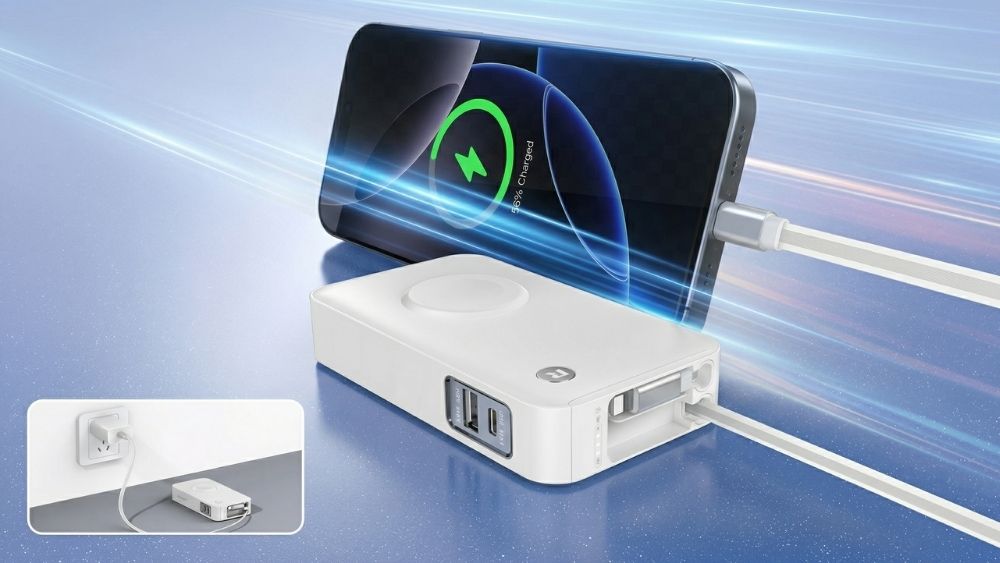
For fast charging away from an outlet, the RORRY Flow® CB4 10000mAh 40W combines up to 40W output with a built-in USB-C cable and foldable wall plug. It can work as a wall charger and a portable power source, so the phone does not have to fall back to a weak laptop port or low-output adapter while travelling.
Turn off the screen and pause games, navigation, video calls, camera recording, and hotspot use. This does not increase the charger's rated output, but it reduces the power being consumed at the same time, so the battery percentage rises faster. Closing ordinary background apps one by one makes far less difference than stopping a genuinely power-hungry activity.
Move the phone out of direct sunlight and away from hot cars, bedding, or other heat-producing electronics. Place it on a hard, open surface. Remove a thick case only when the phone is becoming noticeably warm; a normal case does not always need to come off. Fast charging can slow or pause when the phone is too hot or too cold.
Airplane Mode reduces cellular, Wi-Fi, and Bluetooth activity, while powering the phone off removes most active system demand. The gain is largest when the phone has a weak mobile signal or many background connections. It is usually small when the screen is already off and the phone is idle, so it should be treated as an optional boost rather than a guaranteed percentage improvement.
iPhones enable compatible fast charging automatically. Some Android phones, especially certain Samsung models, include separate Fast Charging or Super Fast Charging controls under Battery settings. Other Android phones activate fast charging automatically when a compatible adapter and cable are connected. Check the battery screen for a fast-charging message instead of assuming every Android phone has the same menu.
If the cable does not seat fully, the connector feels loose, or charging stops when the phone moves, inspect the port under good light. Do not insert a metal tool, toothpick, or other sharp object because the pins can be damaged. Replace a worn cable first; if compacted debris blocks the connector, use an approved cleaning method or professional service.

A cable can limit charging even when the adapter is powerful enough. The cable must support the required current and charging standard. A basic USB-C cable may support 3A and up to 60W under USB Power Delivery, while higher-power charging can require a 5A electronically marked cable. The phone may also need a protocol-specific combination such as USB-C PD or PPS.
Replace a cable that is frayed, bent, unusually hot, loose at either connector, or only works at a certain angle. For a new cable, check its listed wattage and USB-IF compliance instead of choosing only by connector shape. USB-C describes the connector; it does not guarantee one charging speed.
A reliable USB-C power bank should also publish its port output and supported charging standard, allowing you to match the bank and cable to the phone rather than relying on a vague fast-charge label.
Charging from a low-output laptop port is often slower than using a compatible wall adapter. A multi-port adapter can also reduce output when several devices share its total power budget, so check whether the advertised wattage applies to one port or the entire charger.
Pass-through charging does not behave the same on every power bank. Some models reduce phone output while the bank is recharging, while others manage separate limits or support charging only in a specific port combination. Check the product's input and output specifications instead of assuming the incoming power is divided equally.
Charging naturally slows as the battery approaches full. Phones reduce current near the upper end of the charge to manage heat and battery stress, and optimized charging may pause or delay the final portion based on a schedule. If speed matters, the fastest part of the session is normally at a lower battery level rather than from 80% to 100%.
Choosing equipment with clearly published wattage, port roles, and protocol support makes these limits easier to understand. RORRY lists these specifications across its portable and multi-device charging products so users can match the charger to the device before buying.
Closing an ordinary idle app has little effect. Stopping a game, video call, navigation session, camera recording, or hotspot can make a meaningful difference because those activities keep the screen, processor, radios, or camera active while the phone charges.
Compatible fast charging is designed for everyday use. The phone controls its input and lowers power when temperature or battery level requires it. To reduce unnecessary battery stress, keep the phone cool and avoid charging in direct sunlight or under bedding.
Phones reduce charging power near the upper end of the battery to manage heat and battery stress. Optimized charging or a user-selected charge limit may also pause or delay charging. This slowdown is normal and does not mean the charger has failed.
Yes, when it is a compliant USB-C Power Delivery charger and you use a suitable cable. The phone negotiates a supported power level and does not automatically take the full 65W. A proprietary or noncompliant charger may fall back to a slower speed.
The fastest reliable setup is a compatible USB-C PD or PPS charger, a cable rated for the required power, a wall outlet, and a cool phone with the screen off. Start with the charger and cable, then reduce heavy phone use and heat. If charging remains slow with known-working equipment, inspect the port and battery settings before assuming the phone needs repair.


Share:
What Does mAh Mean on a Battery/Power Bank? Complete 2026 Guide
iPhone Charging Port Not Working? Here's How to Fix It