


- by kehuiyi
How to Charge a Power Bank (Fast & Safe Guide)
- by kehuiyi
We usually use a power bank to power up our phones, but charging the power bank itself correctly is just as important.
The process is simple—locate the charger’s input port, connect it to a wall adapter, and unplug it once the LED indicator shows a full charge. However, using the wrong cable or an underpowered adapter can slow down charging or even damage your power bank.
In this guide, we’ll walk you through how to charge a power bank properly, for the fastest and safest speed and longest battery life.
Before you plug your data cable into the charging port, take a moment to understand your device. Plugging the data cable into the wrong port is a major cause of devices failing to charge or breaking down.
High-quality portable chargers (also known as power banks) have multiple ports and understanding their functions is essential for proper charging.
Input Port: This port is strictly for charging the power bank itself. On older models, this is typically a Micro-USB port. On newer models, it is usually a USB-C port.
Output Port: This port is used to transfer power from the bank to your phone or tablet. This is most commonly a standard rectangular USB-A port.
Bidirectional Port (USB-C): On modern devices, the USB-C port often supports Power Delivery (PD), meaning it functions as both an Input (to charge the bank) and an Output (to charge your phone).
Actionable Tip: Inspect the text printed near the ports. Look for labels like IN or INPUT.

Charging speed depends primarily on the charger's power output and the quality of the charging cable.
Using a low-wattage adapter (such as an older 5W phone charger) for a high-capacity 20,000mAh battery is inefficient and can result in charge times exceeding 24 hours.
Check Input Wattage: Review your power bank’s manual or the specifications printed on the device for the "Max Input" value (e.g., 18W or 30W). Use a wall charger that meets or exceeds this wattage.
Cable Quality: Use the original cable provided with the device or a certified third-party cable. Low-quality cables often have high resistance, which restricts current flow and slows down the charging process.

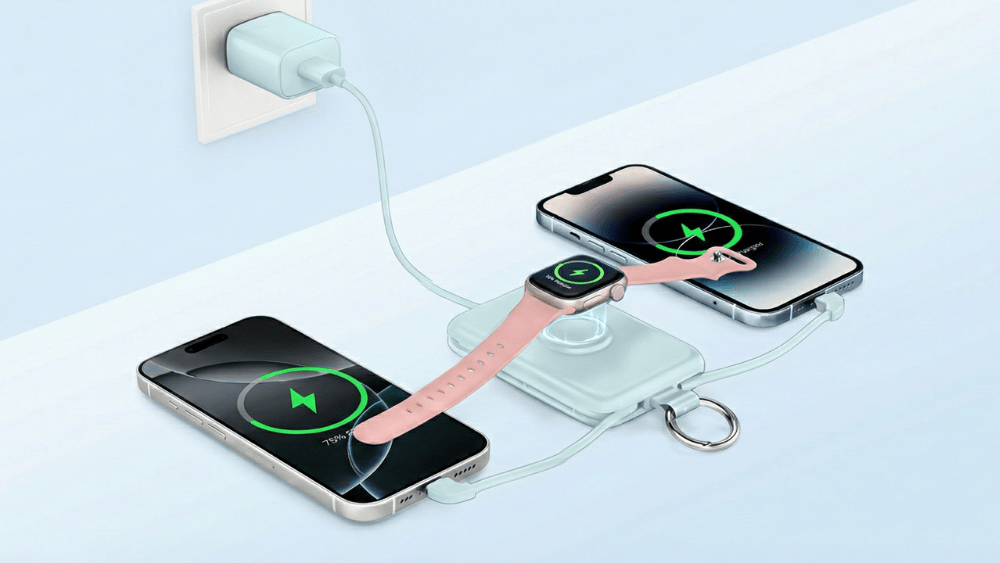
Find a compatible wall adapter and cable. For the best results, use a high-wattage adapter (like a USB-C PD charger) and the cable that came with your device.
Plug your cable into the port marked IN or Input. Connect the adapter to a wall outlet. Be careful not to use the "Output" port, which is only for charging phones.
Once connected, look for the LED indicator lights.
Blinking Lights: This usually means energy is flowing and charging is active.
Solid Lights: This typically indicates the device is fully charged.
Once the LED lights stop blinking and stay solid, unplug the device. Do not leave it plugged in indefinitely.
Storage: Store the portable charger in a cool, dry place. If you aren't using it for a while, aim to keep the battery around 50-60%.
If you don't have a wall adapter handy, you can use other power sources, though they may be slower:
Computer USB Port: You can plug it into your laptop, but expect charging to take 3-4 times longer.
Car Charger: A USB car adapter is a great way to charge while driving.
Plug In Power Bank: If your device features an integrated foldable plug, you can bypass cables and adapters entirely. Simply plug the power bank directly into any standard wall outlet.
When you unbox your new portable charger, it will usually have about 40% to 60% battery life. To ensure the battery stays healthy, follow this simple routine for the first charge:
Use Quality Gear: Do not use a cheap or frayed cable. Connect the portable charger to a reliable, high-quality charger and a damage-free cable.
Monitor the Charge: Plug it in and watch the LED indicators to ensure they are blinking normally. Allow it to charge uninterrupted until the lights indicate it is 100% full.
Do Not Use It Yet: While it is charging for the first time, do not plug your phone into it. Avoid using "pass-through charging" during this initial process; let the battery focus entirely on filling up.
To keep your power bank working well for years, avoid these four common habits
1. Exposing to Extreme Temperatures: Batteries are highly sensitive to their environment. Extreme heat can cause internal swelling or permanent capacity loss, while freezing cold puts immense strain on the chemical cells and causes rapid drainage. Always charge in a room-temperature, ventilated area to ensure safety and longevity.
2. Letting the Battery Hit 0%: Waiting until the battery is completely dead puts unnecessary stress on the cells (known as "deep discharge"). Try to plug it in when it drops to around 20% rather than letting it die completely.
3. Constant "Pass-Through" Charging: Charging your phone and power bank simultaneously generates excessive heat because the battery is working double-time. Only do this in emergencies, not as a daily habit.
4. Using inferior products: Cheap, uncertified power banks provide unstable power and can damage both the power bank and your phone's battery. For safety, choose RORRY, Anker or Ugreen; they have years of professional experience and offer a wide variety of high-quality, durable portable chargers designed to protect your devices and provide reliable charging performance.
5. Using Broken Cables: If you have to wiggle the wire to get the charging light to turn on, the cable is internally damaged. This is dangerous and can short-circuit your device. Replace it immediately.

Now that I know how to charge a power bank, how do I know if the capacity is right for me? Don't just look at the numbers; look at your lifestyle. Even if you're charging correctly, an inappropriate capacity can take a long time to charge:
The Daily Commute (5,000mAh): Perfect for subway rides or office days. A MagSafe pack is the ultimate lightweight safety net—snap it on for a quick boost without dealing with tangled cables.
City Travel (10,000mAh): The "Goldilocks" size. It strikes the perfect balance between power and portability. It fits easily in a pocket yet holds enough energy to keep your phone running through a full day of photos and navigation.
Camping & Groups (20,000mAh+): Here, capacity rules. You need a heavy-duty powerhouse to charge multiple devices over a long weekend. Weight is secondary to survival.
Remote Work (65W PD): If you work from coffee shops, you need a high-output bank. This effectively doubles your laptop's battery life, giving you the freedom to work anywhere without hunting for a wall outlet.
Want to learn more? Check out our detailed guide: What Size Power Bank Do I Need? Equipment and Scene
Correctly charging your power bank comes down to a few key habits: identifying the specific Input port, prioritizing a high-speed wall adapter, and protecting the device from extreme heat. By following these steps and choosing a reliable brand like RORRY, you can avoid the frustration of slow charging speeds and ensure your battery remains healthy for the long run.
Blinking indicates active charging. The position of the blink shows the level (e.g., 3rd light blinking means 50-75% full). Solid lights mean it is fully charged.
This is a safety feature called "trickle charging." The speed drops significantly to prevent the battery from overheating and to protect the chemical lifespan of the cells.
Generally, yes. Modern portable chargers have auto-cutoff circuits. However, unplugging it when full is always the best practice for safety.
Mild warmth is normal for wireless charging due to energy induction. If it becomes burning hot to the touch, remove the device immediately.


Share:
What Size Power Bank Do I Need? Equipment and Scene
Is MagSafe compatible with non-Apple devices? Compatibility list