


- par Fuzley
Can a Swollen Battery Explode? Signs and Safe Steps
- par Fuzley
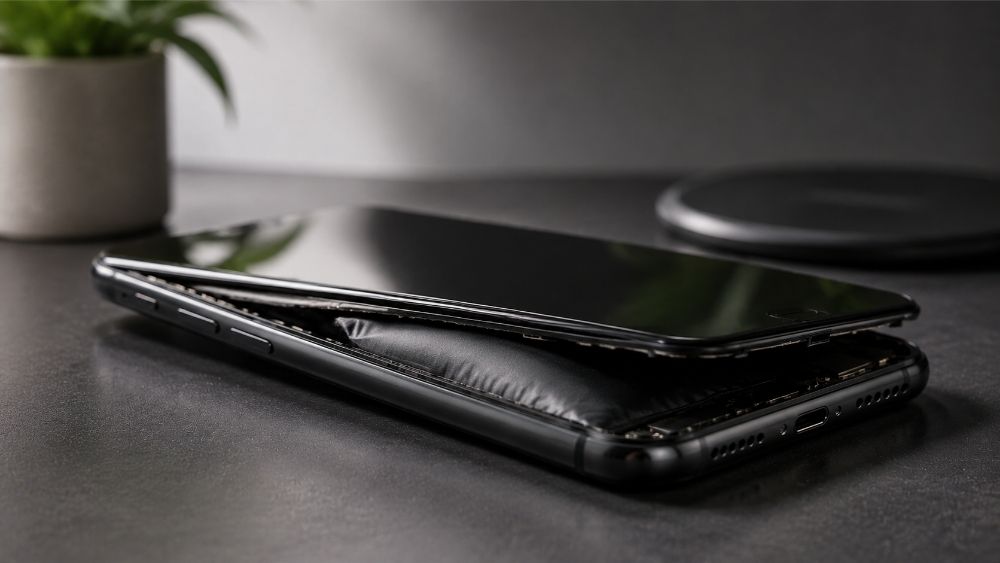
A swollen battery will not necessarily explode, but it is no longer safe to use. Swelling shows that the cell has been damaged and gas has built up inside it. Most swollen batteries do not suddenly explode while left undisturbed, but charging, heat, pressure, impact, bending, or puncture can increase the risk of rupture, fire, or thermal runaway. Stop using and charging the device and arrange professional handling. This guide explains how to recognize the warning signs, respond safely, and reduce the chance of another battery failure.
Not every swollen battery explodes, and swelling alone does not show when or whether ignition will occur. However, the swelling confirms that the cell has failed and is a potential fire hazard. Gas has accumulated inside the sealed casing because the battery's internal chemistry has broken down.
The casing may continue to contain the damaged cell while it remains cool and undisturbed. The danger rises if the battery is charged again, overheats, continues expanding, or is crushed, bent, dropped, or punctured. For that reason, a swollen battery should be taken out of service even when the device still works normally.
The risk is higher when the swelling is getting worse or the device shows additional warning signs:
Do not lean close to smell or inspect the battery. If it is hot, smoking, leaking, or making unusual sounds, treat it as an active emergency rather than a routine repair.
Swelling may begin inside the device before the battery itself is visible. Stop and investigate if the shape of a phone, laptop, or portable power bank changes.


A power bank may have a warped or split casing, a surface that no longer sits flat, unusual heat, a chemical odor, or crackling and hissing sounds. Stop using it immediately. Do not reconnect it to check whether it still works.
If a swollen power bank needs to be replaced, stop using it and arrange safe disposal first. For a properly specified replacement with regulated output and built-in protection, the RORRY CharmGo® D4 10000mAh Power Bank is a compact option for everyday charging. It replaces the damaged accessory only; it cannot repair or make a swollen device battery safe.

Battery swelling occurs when chemical breakdown inside a lithium-ion cell produces gas. Age, heat, manufacturing defects, physical damage, and unsafe charging equipment can all contribute.
High temperature accelerates battery degradation. A phone left in a hot car, a laptop used on a surface that blocks ventilation, or a device repeatedly charged while already hot may age faster. Modern devices normally stop true overcharging, so leaving a phone connected does not continuously force power into it. However, long periods at a high state of charge combined with heat can increase battery wear.
A standards-compliant charger does not force its full advertised wattage into a phone; compatible devices negotiate the power they need. The greater concern is a damaged, counterfeit, poorly regulated, or incorrect-voltage charger that overheats or supplies unstable power. Stop using any cable, adapter, or power bank that is cracked, deformed, loose, excessively hot, or behaving unpredictably.
Lithium-ion batteries lose capacity and chemical stability as they age. Rapid drain, unexpected shutdowns, poor performance, and unusual heat can indicate deterioration, although these symptoms do not always mean the battery is swollen. Visible deformation is the sign that the device must be taken out of service.
Drops, crushing, bending, puncture, water exposure, or an internal defect can damage the thin layers inside a cell. The resulting internal short circuit or chemical breakdown may produce heat and gas. A damaged device should be inspected even when the battery has not visibly swollen yet.

What you should do depends on whether the battery is swollen but stable or already showing signs of rapid failure.
Do not pick up or move a device that is already hot, smoking, leaking, or making hissing or popping sounds. Move people away from the immediate area, avoid breathing fumes, leave the room or building if necessary, and call local emergency services. Follow the instructions of the fire department or emergency operator.
Water, improvised containers, and household tools are not substitutes for professional emergency guidance. Do not seal an active battery in an airtight container, and do not carry it through occupied areas.
Never place a swollen lithium-ion battery or a device containing one in household trash, curbside recycling, or an ordinary battery collection box. Damaged batteries require special handling and may not be accepted by every retail drop-off point.
Contact the device manufacturer, an authorized repair provider, or your local household hazardous-waste program first. Tell them that the battery is swollen and ask how the complete device should be stored and transported. The U.S. Environmental Protection Agency identifies swelling as battery damage and a potential fire hazard. It recommends keeping the battery or device in a safe location while the correct disposal option is arranged.
Do not mail or ship a swollen battery unless an authorized service has provided packaging and transport instructions. Transportation rules for damaged lithium batteries are stricter than the rules for ordinary used batteries.
No charging habit can eliminate every battery defect, but a few practical steps reduce avoidable heat and physical stress.
Do not leave devices in hot cars or direct sunlight, and do not cover them with bedding while charging. Pause charging if the device becomes abnormally hot. If your iPhone regularly gets hot when charging, identify the cause instead of treating persistent heat as normal.
Use undamaged charging accessories from reputable manufacturers and confirm that the charger supports the device's required voltage and charging standard. A higher wattage rating is not automatically unsafe when both devices follow the same charging protocol. When replacing worn or unreliable equipment, compare RORRY charging solutions by device compatibility, charging protocol, output, and safety features rather than choosing an unknown accessory on price alone.
Do not crush a power bank in an overpacked bag, use a phone with a separating screen, or continue operating a laptop with a raised touchpad. Replace accessories with damaged housings or loose ports before they become an electrical or thermal problem.
Battery percentage alone does not show whether a cell is safe. Pay attention to rapid capacity loss, unexpected shutdowns, repeated overheating, and changes in the device's shape. Arrange a professional inspection before visible swelling becomes severe.
No. Swelling indicates permanent internal damage. Cooling the battery may temporarily change its appearance, but it does not restore the cell or make it safe. The battery must be removed from service and handled through an approved repair or recycling process.
No. Charging adds heat and energy to an already damaged cell. Disconnect it if this can be done safely, power the device off, and do not charge it again.
No. Do not puncture, press, bend, flatten, or open the battery. These actions can cause an internal short circuit, fire, or thermal runaway. Have the complete device handled by a qualified professional.
There is no reliable timeline. A swollen battery may remain cool for a period or deteriorate quickly after heat, charging, impact, or additional internal damage. Treat any visible swelling as a reason to stop using the device immediately.
Not without checking first. Many ordinary collection bins do not accept damaged lithium batteries. Call the retailer, certified electronics recycler, manufacturer, or local hazardous-waste program and explain that the battery is swollen before taking it there.
A swollen battery can rupture or catch fire, so it should never be charged, pressed, punctured, or tested again. If the device is cool and stable, power it off and contact a qualified repair or hazardous-waste service. If it is hot, smoking, leaking, or hissing, move away and contact local emergency services rather than handling it yourself.


Share:
Does iPhone 16e Have MagSafe? Here's the Truth
How to Charge iPad Without a Charger?6 Methods