


- by Fuzley
Can an Apple Watch Charger Charge an iPhone? The Facts
- by Fuzley
A standard Apple Watch charging puck cannot charge an iPhone, but one charger can still power both devices when it includes separate iPhone and Apple Watch charging areas.
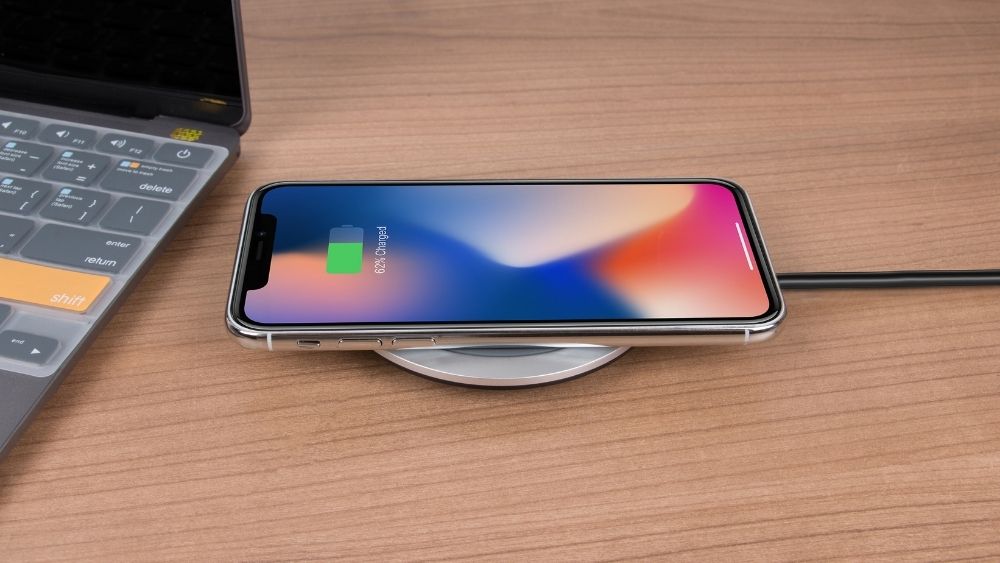
No. Placing an iPhone on the small round charging puck supplied for Apple Watch will not charge the phone. The puck is designed for the charging system and shape on the back of an Apple Watch, while an iPhone uses Qi or MagSafe-compatible wireless charging.
You may feel a slight magnetic pull, but that does not mean power is flowing. If the iPhone does not show its charging symbol, the battery is not being charged. It will not begin charging more slowly if you leave it on the puck for longer.
This limitation applies to a standalone Watch puck, not every magnetic charging product. A 3 in 1 charging station can charge an iPhone and Apple Watch together because it contains a phone charging surface and a separate Watch charging module.

Apple Watch uses a compact magnetic inductive charging system built around the back of the watch. The iPhone uses the Qi wireless charging standard, with MagSafe adding magnetic alignment on supported models. Both transfer energy without an exposed plug, but their charging hardware is not interchangeable.
Wireless power depends on close alignment between the transmitting coil in the charger and the receiving coil in the device. The coil and magnetic pattern in an Apple Watch puck are much smaller than the iPhone charging area. Resting an iPhone on the puck does not place it over a suitable iPhone transmitter.
A compatible charger and device communicate before normal power delivery begins. The Watch puck is made to recognize and charge supported Apple Watch hardware. An iPhone does not complete the same charging connection, even though the two products are part of the same Apple ecosystem.
The word magnetic describes how a device aligns; it does not identify every device the charger supports. The key question is whether the product has the correct charging surface for each device.
|
Charging Product |
iPhone |
Apple Watch |
How It Works |
|
Standard Apple Watch puck |
No |
Yes |
One small charging area made for Apple Watch |
|
Apple iPhone MagSafe puck |
Yes |
No |
One larger charging area made for iPhone and compatible Qi devices |
|
RORRY multi-device MagSafe charger |
Yes |
Yes |
Separate phone and Apple Watch charging modules in one product |
|
3-in-1 charging station |
Yes |
Yes |
Dedicated positions for iPhone, Apple Watch and AirPods |
|
USB-C wall adapter |
With the right cable |
With the Watch cable |
The adapter can be shared even though the charging heads cannot |
Apple's single-purpose iPhone MagSafe puck is not an Apple Watch charger. However, a magnetic power bank or stand can support both when its design includes a separate Watch module. Understanding the difference between MagSafe and USB-C charging also makes it easier to choose between wireless convenience and faster wired charging for the iPhone.
The USB-C wall adapter that powers an Apple Watch cable can usually be reused for an iPhone. Disconnect the Watch cable and attach the correct USB-C or USB-C-to-Lightning cable for the phone. A compatible 20W or higher RORRY charger can also serve multiple Apple devices when you connect the appropriate cable or charging accessory.
To charge both devices at once, use a multiport adapter or a charging station. Check the total output because some adapters divide their available power when more than one port is active.

The reverse direction works on iPhone 15 and later. Connect an Apple Watch Magnetic Fast Charger to USB-C Cable directly to the iPhone's USB-C port, then place the Watch on its puck. The phone supplies power through the cable; the back of the iPhone does not wirelessly charge the Watch.
This is useful for an emergency top-up, but it consumes the iPhone's battery. A wall adapter or portable battery is a better routine power source when both devices need charging.
The simplest options are two cables connected to a multiport adapter, a dual-device magnetic power bank, or a 3-in-1 station. The right choice depends on whether you mainly charge at a desk or need backup power while traveling.
The RORRY D13 5000mAh MagSafe Power Bank is a compact option for carrying iPhone and Apple Watch power together. It provides magnetic wireless charging for a compatible iPhone, a separate 3.5W Apple Watch charging area, and USB-C input and output up to 18W. The 5,000mAh battery, finger ring and 144g weight suit everyday carry, and the phone and Watch can charge simultaneously.

This model is useful when the priority is portability rather than replacing a full bedside station. The iPhone uses the larger magnetic phone surface, while the Apple Watch uses its own charging point; the Watch puck is not being used to charge the phone.
The RORRY M3 10000mAh 3-in-1 Charger is better suited to users who also carry AirPods. Its foldable design provides marked charging positions for a compatible iPhone, Apple Watch and wireless-charging AirPods case, backed by a 10,000mAh battery. The USB-C port supports up to 20W input and output, and all three Apple devices can charge at the same time.

For a trip or shared nightstand, the M3 replaces several loose cables with one portable unit. When pass-through charging and multiple device outputs are used together, an adapter above 20W is recommended for stable performance.
Yes, but compatibility is limited. Apple lists AirPods 4 with Active Noise Cancellation, AirPods Pro 2 and AirPods Pro 3 charging cases as compatible with an Apple Watch wireless charger. Center the closed case on the puck with its status light facing up.
Connect the correct cable to a powered USB-C port on a computer, car charger or power bank. You can also use a compatible MagSafe or Qi charger that is connected to power. An unpowered cable or Watch puck cannot supply energy by itself.
The iPhone does not normally show a wattage reading or a permanent Fast Charging label. Use a compatible USB-C Power Delivery adapter and cable, then observe how quickly the battery rises at a low charge level. Charging slows naturally as the battery fills or the phone gets warm.
Use another Apple Watch-compatible charging surface, such as an Apple charger or an accessory carrying the Made for Apple Watch badge. Some multi-device chargers include this module. A standard Qi phone pad or single-purpose iPhone MagSafe puck is not a substitute.
First confirm that the charger explicitly supports Apple Watch, because most ordinary Qi pads do not. Remove protective film or a bulky case, center the Watch on its charging area, clean both surfaces and reconnect the adapter. If no charging symbol appears, restart the Watch and test another compatible cable or adapter.
A standalone Apple Watch puck cannot charge an iPhone, but a properly designed MagSafe power bank or multi-device station can charge both because it provides separate charging hardware for each device. Choose a compact dual-device model for everyday carry or a 3-in-1 station when you also want a dedicated AirPods charging position.
Share:
The New Power Palette: When Tech Becomes Part of the Look