


- by Fuzley
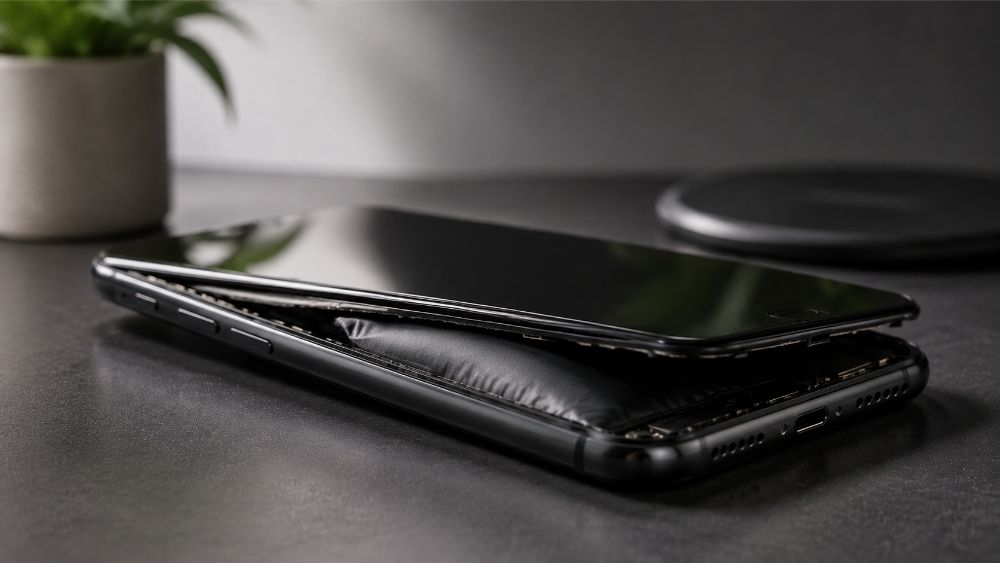
Will a Swollen Battery Explode? Signs & What to Do
- by Fuzley
A swollen battery can explode or catch fire, but only in rare cases — and usually not without warning signs first. The bigger risk is ignoring it. This guide explains what causes battery swelling, how to spot it early, and exactly what to do if it happens to your device.
Yes, but in rare cases. Swelling means gas is accumulating inside the sealed battery casing — a byproduct of internal chemical reactions gone wrong. The casing expands to contain that pressure, but it has limits. If the battery continues to swell, gets punctured, is exposed to heat, or is charged while already damaged, it can rupture violently or catch fire — though most swollen batteries don't reach this point if handled promptly.
The risk increases significantly if you notice any of these alongside the swelling:
The battery continues to grow in size
A sweet or chemical smell coming from the device
The battery or device feels unusually hot
Visible smoke, leaking fluid, or hissing sounds
If any of these appear, treat the situation as an emergency. Move the device away from flammable materials immediately. A quality RORRY portable charger with over-voltage protection is a safer option for on-the-go charging than an unknown-brand adapter.

Battery swelling happens when internal chemical reactions become unstable and produce gas. Several factors trigger this.
Forcing too much voltage into battery cells — either through a faulty charger or leaving a device plugged in constantly — causes the electrolyte to break down and release gas. Modern devices have protective circuits, but continuous trickle charging over long periods still creates thermal stress on the cells.
Low-quality or incompatible chargers deliver unstable voltage and poorly regulated current. This generates excess heat during charging, which accelerates the internal reactions that cause swelling. Certified portable chargers and chargers with regulated output significantly reduce this risk.

Heat is one of the most consistent triggers of battery swelling. Leaving devices in hot cars, direct sunlight, or poorly ventilated spaces raises battery temperature well beyond safe operating limits. Even a phone getting hot regularly during charging is a sign that thermal stress is building up over time.
Lithium-ion batteries degrade with every charge cycle. After hundreds of cycles, the internal materials become less stable and more prone to gas generation. Older devices — especially those several years past their last battery replacement — are significantly more likely to develop swollen batteries.
Dropping a device, crushing it, or puncturing the battery can cause an internal short circuit. This creates a rapid and uncontrolled release of energy, generating intense heat and gas very quickly. Even minor dents or pressure damage to the battery casing can compromise internal layers and lead to swelling over time.
Swelling isn't always immediately visible, but there are clear signs to watch for depending on your device. The same warning signs apply whether you're checking a phone, laptop, or power bank — any device with a lithium battery can be affected.
The screen lifts or separates from the frame
The back panel bulges outward
The phone no longer lies flat on a surface
Buttons become stiff or difficult to press
Unusual heat during normal use or charging
The bottom panel bulges or feels under tension
The touchpad becomes unresponsive or stiff
Keys are harder to press than usual
The device generates more heat than normal
The laptop wobbles on a flat surface
Power banks are especially prone to swelling because they contain large battery cells in compact housings. Signs include a bloated or warped casing, crackling sounds during charging, unusual heat, or the unit no longer sitting flat. A swollen power bank should be removed from use immediately — the same risks apply as with any other lithium battery.

Act quickly and carefully. The priority is to stop stressing the battery and get it away from anything flammable.
Unplug the device from any power source and stop using it immediately. Continuing to charge or operate a device with a swollen battery increases internal pressure and heat, raising the risk of rupture or fire.
Turn the device off completely. Move it to a non-flammable surface — metal, tile, or concrete — away from paper, fabric, or wood. If possible, place it in a fireproof container such as a metal box or a container filled with dry sand. Do not seal it in an airtight plastic bag.
Keep the device out of reach of children and pets, and don't leave it unattended if it's actively swelling or producing heat.
If the battery is removable, handle removal with extreme caution:
Wear protective gloves and safety goggles
Use plastic or non-metallic tools only — metal tools can cause a short circuit
Never puncture, bend, press, or try to flatten the battery
If the battery feels hot or is visibly leaking, do not attempt removal yourself — take it to a professional
If the battery is glued in place (as in most modern smartphones and laptops), do not attempt DIY removal. Take the device to an authorized repair center or Apple Store. Professionals have the correct tools and safety protocols.
Never throw a swollen battery in regular household trash. Lithium batteries are classified as hazardous waste. Take the battery or device to:
A certified electronics recycling center
An electronics retailer with a battery drop-off bin
Your local municipal hazardous waste facility
When dropping off a damaged battery, inform the staff that it is swollen. Many collection points have specific handling procedures for pressurized or damaged cells.
Good habits reduce the risk significantly.
Use certified charging accessories. Chargers with regulated voltage output prevent the kind of unstable power delivery that accelerates battery degradation. Avoid cheap, uncertified chargers — they may appear to work but consistently deliver inconsistent power.
Avoid leaving devices on charge continuously. Once a device reaches 100%, unplug it. Continuous trickle charging keeps the battery under thermal stress, especially overnight. Enable optimized charging features where available — iOS and Android both offer settings that reduce full-charge time.
Keep devices away from heat. Don't leave phones or laptops in hot cars, direct sunlight, or poorly ventilated bags. Charge at room temperature when possible — the safe range for most lithium batteries is 15°C to 25°C (59°F to 77°F). If your phone gets hot when charging regularly, address it before it accelerates battery wear.
Don't let the battery fully drain regularly. Deep discharge below 10–20% puts stress on lithium cells. Recharging a deeply discharged battery can trigger the same unstable reactions that cause swelling. Try to keep devices charged between 20% and 80% during daily use.
Replace aging batteries proactively. If a device is several years old and showing signs of rapid drain, sudden shutdowns, or unusual heat — even without visible swelling — the battery may be near the end of its safe lifespan. Replacement before failure is safer and cheaper than dealing with a swollen battery.
Inspect devices regularly. Before charging, give your phone, laptop, or power bank a quick visual check. Any gap between the screen and frame, a back panel that won't sit flat, or a device that rocks on a table is worth investigating before the next charge cycle.
No. Once a battery has swollen, the internal chemical damage is permanent. The gas cannot be safely released, and the battery will not return to its original shape. It must be replaced.
No. Charging a swollen battery increases internal pressure and heat, which can lead to leakage, fire, or rupture. Stop charging immediately and power the device off.
No. There is no safe way to repair a swollen battery. Puncturing it to release the gas — as some online guides suggest — will almost certainly cause an immediate fire, as the internal components react violently with air. The only correct action is safe removal and disposal.
There's no predictable timeline. A battery can swell slowly over weeks or rapidly within hours, depending on the cause. Any swelling should be treated as an immediate safety concern, regardless of how recently it appeared.
Not common, but not rare either. The risk increases significantly with older devices, cheap chargers, frequent full discharge cycles, and regular exposure to heat. Following basic battery care habits substantially reduces the likelihood.


Share:
Does iPhone 16e Have MagSafe? Here's the Truth
How to Charge iPad Without a Charger?6 Methods